CacheNLPResponse
Overview
The idea behind this is to create a local cache for utterances such that we need not to hit the NLP Server Everytime and to identify things that are difficult to understand from AI.
Field in cacheNLPResponse:
  {
      "_id" : ObjectId("61f274dc66d4461fdd645309",
      "updatedAt" : ISODate("2021-08-27T14:25:28.143+05:30"),
      "createdAt" : ISODate("2021-08-27T14:25:28.143+05:30"),
      "__v" : 0,
      "text" : "book test ride",
      "analysisResponse" : {
          "initialNlpAnalysisSnapshot" : {
            "entitySnapshot" : [ ],
            "intentSnapshot" : {
                "score" : 0.9593519568443298,
                "intent" : "book_test_ride"
            },
            "name" : "oriNlp"
        },
        "statusCode" : 200,
        "intentName" : "book_test_ride"
      }
  }
How to add document in cacheNLPResponse
- Go into the collection named cacheNLPResponse in DB and click on Add document.
- Enter the text and the intent for which you want to map it to.
    db.getCollection("cacheNLPResponse").insert({
        "updatedAt": ISODate("2021-12-13T12:15:51.065+05:30"),
        "createdAt": ISODate("2021-12-13T12:15:51.065+05:30"),
        "__v": 0,
        "text": "recharge",
        "analysisResponse": {
            "initialNlpAnalysisSnapshot": {
                "entitySnapshot": [],
                "intentSnapshot": {
                    "score": 0.9593519568443298,
                    "intent": "recharge"
                },
                "name": "oriNlp"
            },
            "statusCode": 200,
            "intentName": "recharge"
        }
    })
The key “text” contains the predefined text, here we write the text for which we want to trigger the intent.
Ex: for "recharge" intent we can put text as “recharge”.The key “intent” inside intentSnapsot and the key “intentName” is where we put our intent’s name which we want to trigger.
Ex: “recharge” can be put up here.The key “score” inside “intentSnapshot” represents the probability with which the match happened, it is mainly like a virtual representation of how a match happen with AI.
Ex: in case of AI, a text matches to an intent with some probabilty so we put this no here as to depict the probabilty of the match for out text to intent.
Use case
- To create a local cache in order to avoid hitting the NLP Server for every text.
- To map complex text, to an intent which is hard to understand by NLP.
Working
Head to branch product-testFinal1
File name - ../ori-communication-service/BrainService/BrainService.js
- User message analysing function [function name -
analyzeUserMessage]- It analyses the message entered by the user
async function analyzeUserMessage(socket, serviceName, userData, session_doc, isHeartbeat = false) {
try {
   return new Promise(async (resolve, reject) => {
       .
       .
       if (process.env.cacheNLPResponse === 'true'){
           const canchedNLPDoc = cacheNLPResponses.find(o => (o.text === userText));
           if (canchedNLPDoc && canchedNLPDoc.analysisResponse) {
               console.log("used cachedNLPDoc")
               if (canchedNLPDoc.analysisResponse.initialNlpAnalysisSnapshot) {
               canchedNLPDoc.analysisResponse.initialNlpAnalysisSnapshot.name = NLP_SERVICE_NAME;
               }
               session_doc = await update_entities_in_db_without_check(session_doc, {
               cacheNLPResultSnapshot : canchedNLPDoc.analysisResponse
               });
               return resolve(_.cloneDeep(canchedNLPDoc.analysisResponse));
           }
       }
   }
   .
   .
   .
}
- When a user enters a text, analyzeUserMessage function tries to find a exact match where the text is same to as user entered in the cacheNLPResponse collection. And if it finds a match then the intent mentioned inside the analysisResponse is triggered.
- cacheNLP match is only checked if the field named "cacheNLPResponse" in .env file is true.
- It analyses the message entered by the user
Result
Entry in Database
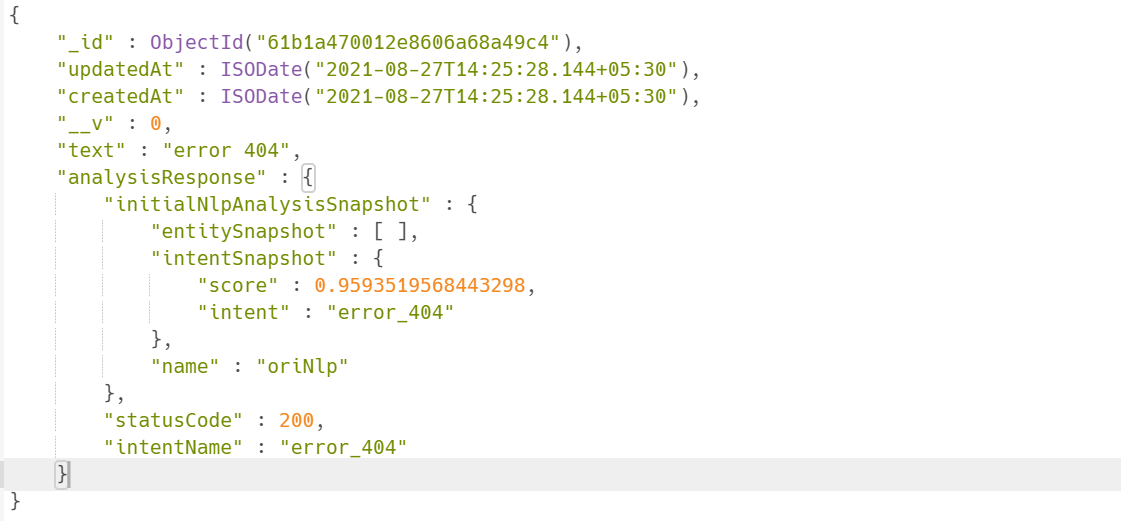
Result when user wrote the same text
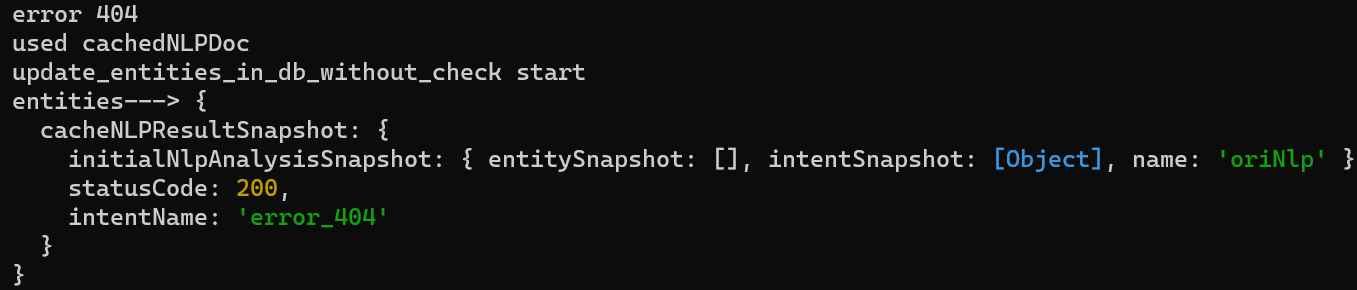
Here we see that the intent got triggered from the cacheNLPResponse.
Drawback
- The drawback in this is that it only works when the string is exactly same as the text in cacheNLPResponse, one extra space can also cause it to dismatch.